Education on Meta Quest

Education on Meta Quest, without a fixed curriculum

Most VR education apps ship a set of prepared lessons. CuriosityXR builds the lesson from your question, then puts the answer in your room as a 3D model you can hold.

Education on Meta Quest, in two shapes

Educational apps for Meta Quest tend to fall into one of two categories, and the difference matters more than the subject matter does.

The first is lesson-based. Someone authored a set of guided experiences ahead of time: an anatomy atlas, a language practice scenario, a tour of a historical site. These are polished and well suited to a set curriculum. Their limit is the edge of what was authored, so the moment a learner asks something unplanned, the app has no answer.

The second is generative. There is no library of prepared lessons because the lesson is assembled from the question. CuriosityXR works this way, which is why it has no fixed subject list and why follow-up questions do not run out.

What that changes in practice

A learner using a lesson-based app works through what is there. A learner using CuriosityXR starts somewhere and follows the thread.

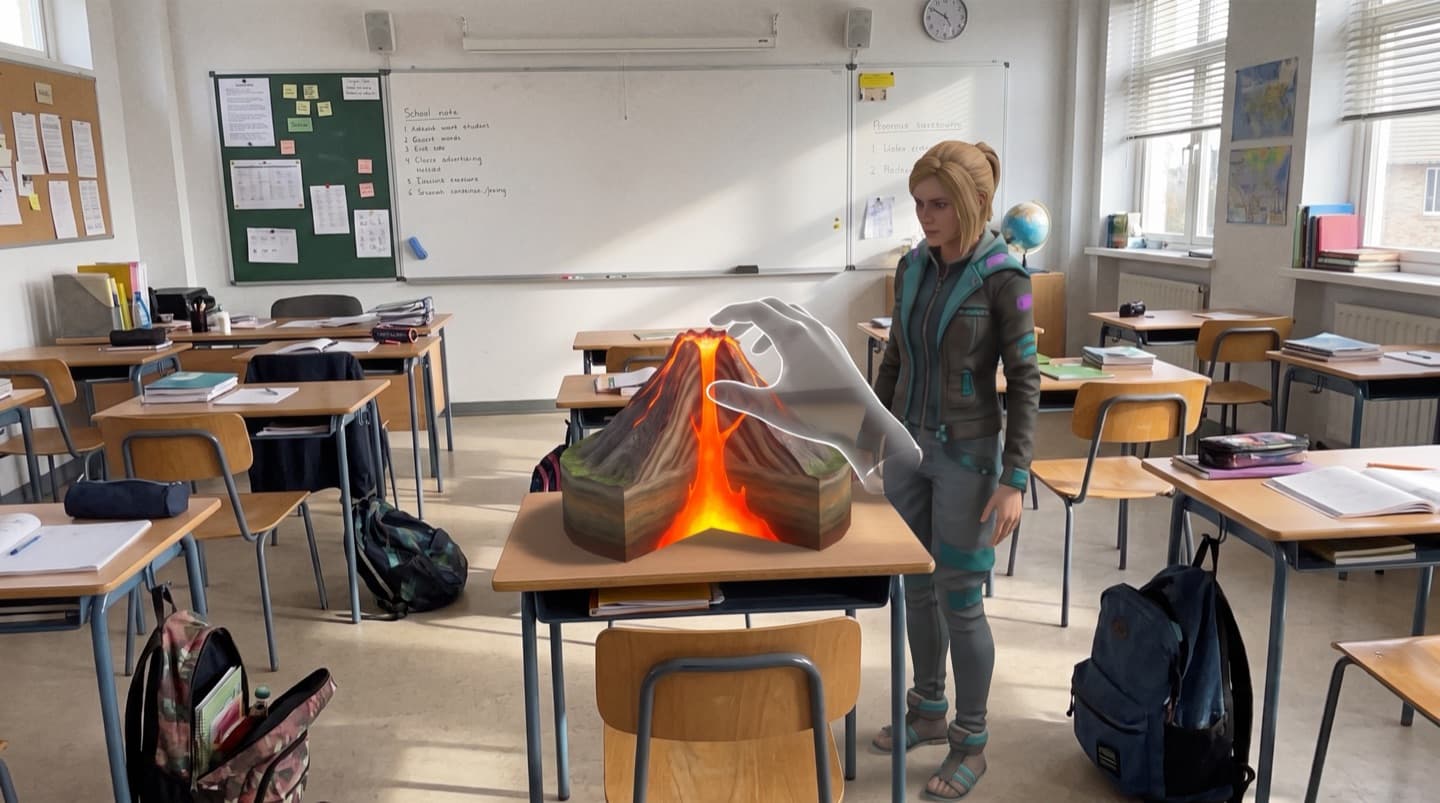
  • Ask out loud and the AI teacher answers in speech while placing a matching 3D model in your room.
  • Draw on a library of more than 1 million models, so obscure questions still get an object rather than an apology.
  • Handle everything directly: scale a model up, walk around it, pull it apart.
  • Change direction at any point. A question about volcanoes can become a question about plate tectonics without leaving the session.

Which Meta Quest headset suits learning best

Meta Quest 3 and Quest 3S are the strongest choices, because colour passthrough places models in your actual room. That matters for judging real scale, and it keeps a learner aware of the people around them, which is the difference between a solitary activity and one a parent or teacher can share.

Meta Quest 2 and Quest Pro are fully supported and work as immersive VR rather than mixed reality. CuriosityXR runs on all four, with hand tracking and Touch controller support.

Homeschooling

Homeschooling families are the largest group of CuriosityXR users. The pattern parents describe is consistent: a learner who resists worksheets will spend an hour taking apart a 3D heart and asking what each part does.

Parents of neurodivergent and autistic learners report this most strongly. Hands-on spatial exploration holds attention where flat material does not, and because there are no quizzes, grades or forced lesson plans, there is nothing to fail at.

Classrooms

CuriosityXR runs on standard Quest hardware with no special configuration, and Meta provides device management for schools running headsets at scale.

Teachers tend to use it for demonstration and exploration rather than as a graded activity. Asking a class what they want to see, and then showing it at full scale in the room, is the use case it was designed around.

Subjects people actually explore

Anatomy, astronomy, biology, geology, geography and history come up most. The common starting points are the human heart, the solar system, volcanoes, DNA and world maps.

Because each answer is generated on demand, the practical range is far wider than any published subject list, and the interesting sessions are usually the ones that wander off it.

FAQ

Meta Quest for learning, answered

Which headset suits education best, whether Quest works for homeschooling and classrooms, and what you can actually study.

Meta Quest education apps fall into two groups. Most are lesson-based: a fixed set of guided experiences on a specific subject, such as anatomy atlases, language practice or historical site tours. A smaller group is generative, building the lesson live from whatever you ask. CuriosityXR is in the second group, which is why it does not have a fixed subject list.

Meta Quest 3 and Quest 3S are the strongest choices because their colour passthrough puts 3D models in your actual room, which matters for learning at real scale and for staying aware of the people around you. Quest 2 and Quest Pro work well too, as a fully immersive experience rather than a mixed reality one.

Yes, and homeschooling families are one of the largest groups of CuriosityXR users. The appeal is usually that a learner who resists worksheets will happily spend an hour pulling apart a 3D heart. Parents of neurodivergent and autistic learners in particular report that hands-on spatial exploration holds attention where flat material does not.

Yes. Meta offers education-specific device management for schools, and CuriosityXR runs on standard Quest hardware with no special setup. Because it has no fixed curriculum, teachers tend to use it for exploration and demonstration, letting students ask about a topic and see it at full scale, rather than as a graded activity.

Anatomy, astronomy, biology, geology, geography and history are the most common. Popular starting points are the human heart, the solar system, volcanoes, DNA and world maps. Because every answer is generated on demand from a 1M+ model library, the practical subject range is much wider than any fixed list.

#1 AI LEARNING APP ON META QUEST

CuriosityXR, the #1 AI learning app on Meta Quest

Experience the future. Today.

with the power of AI and Mixed Reality